Anatomy 3D Atlas
- 4.4
- Rating
- 5.00M
- Installs
- Free
- Price
 Analysis by App-foxy
Learning anatomy is much easier when I can rotate a structure, hide what is in front of it, and build an understanding of how the body fits together instead of memorizing isolated names from a flat page. That is the main reason Anatomy 3D Atlas has stayed useful for me. It turns a phone or tablet into an interactive anatomy reference, with the emphasis on exploring human structures rather than simply reading definitions.
Created by Catfish Animation Studio, this free medical app is aimed at a wide audience. It has an Everyone age rating, so it is approachable for curious beginners as well as students who want a visual companion during revision. The app has a 4.1 average from around 21 thousand ratings and has passed 5 million installs, which gives me some confidence that it has found a practical place outside a very narrow classroom niche. Its short store label is “Anatomy 3D,” but in daily use I think of it more as a visual study atlas than as a complete medical course.
How the current version feels in everyday use
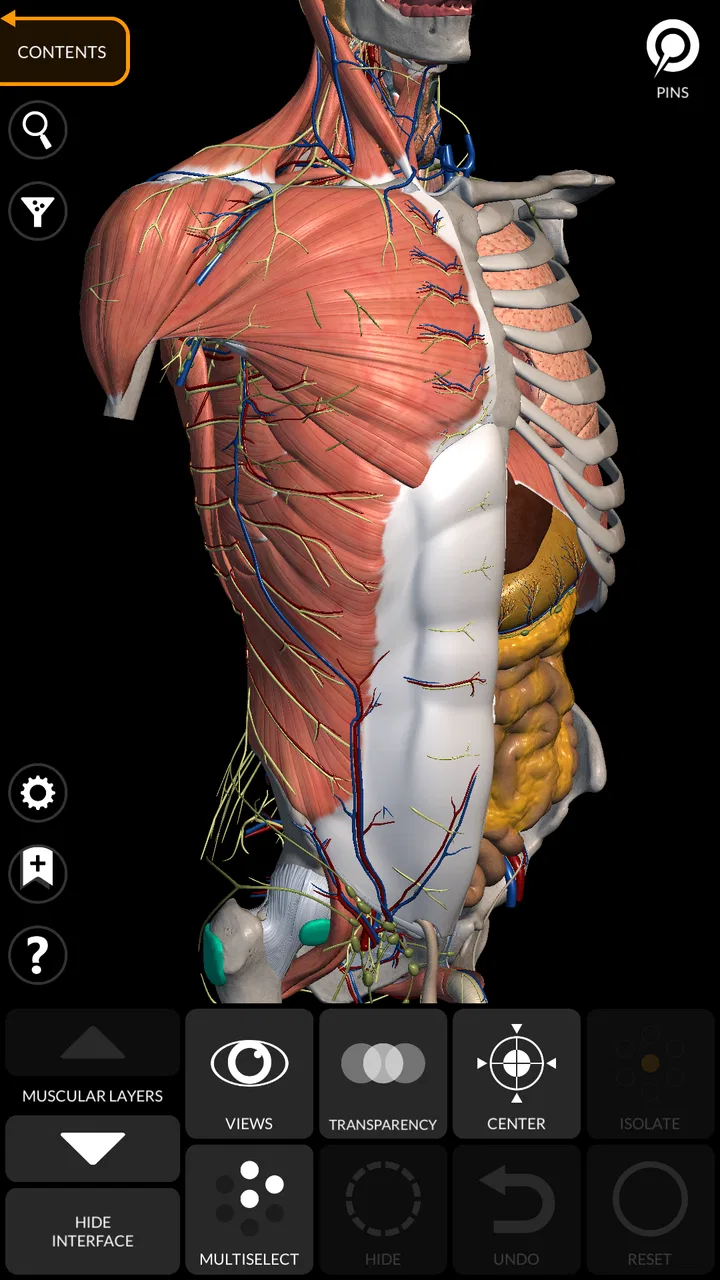
The strongest part of the experience is the ability to inspect anatomy spatially. When I am trying to understand where one structure sits in relation to another, a three-dimensional model is more helpful than a labeled illustration. I can approach a topic by looking at the body as a whole, then narrow my attention to a region and examine the layers that would otherwise be difficult to picture.
You May Also Like

 AccuWeather: Weather Radar
AccuWeather Review: A Quick, Clear Forecast for Everyday Decisions
For everyday plans, the best forecast is the one you can understand quickly. AccuWeather makes rain timing, radar, and local conditions easy to act on, with a few trade-offs.

 Hill Climb Racing
Why Hill Climb Racing Still Turns Crashes Into One More Run
A tiny car, a bumpy hill and one more upgrade: Hill Climb Racing keeps resurfacing because its simple chaos makes every near-miss feel personal.

 AliExpress - Shopping App
AliExpress Makes Global Shopping Feel Personal, but Shoppers Bear the Risk
AliExpress turns a global marketplace into a pocket-sized discovery engine. Its reach is useful, its shopping loop compelling, and its trade-offs easy to miss.

 Lords Mobile: Kingdom Wars
Lords Mobile Is a Kingdom-Building Routine, Not a Quick Match
A case-by-case verdict on the building, battles, device demands, and social commitments that make Lords Mobile rewarding for some players and exhausting for others.

 PDF Scanner app - TapScanner
TapScanner Makes Paperwork Easier to Capture, Check, and Share
TapScanner makes scanning with a phone feel less like a rescue operation and more like a dependable step in getting work done. Its capture tools are useful, though not flawless.

 Block Blast!
 Shows How Much a Puzzle Game Can Leave Out
A quiet grid game shows why puzzle players increasingly value instant clarity, repeatable skill and low-pressure play—and where the genre still needs to catch up.
More From Our News Desk
View All News


This matters most with areas where structures overlap. A printed diagram can show a muscle clearly, but it may not explain what lies underneath it or how nearby bones affect its position. With an interactive model, I can change my viewpoint and mentally connect the visible shape with the surrounding anatomy. That makes the app particularly useful for early study sessions, when I am still forming a map of the body.
I would not describe it as a replacement for a textbook. A textbook gives more context, terminology, explanations, and clinical detail in a carefully ordered sequence. This app is better at answering questions such as “Where is that located?” or “What is behind this structure?” I often use it beside written notes rather than instead of them.
The interface also suits short study periods. If I have only a few minutes before class or while reviewing a topic, I can open a region and inspect it without committing to a long lesson. That makes it more practical than a large reference book for quick visual checks. The trade-off is that a short session can become unfocused if I simply rotate models without a clear question in mind.
A realistic study routine
One routine that works well for me is to begin with a question from my notes. For example, after reading about the shoulder, I use the atlas to locate the bones first, then add the muscles and compare their positions from several angles. I close the app and try to describe the arrangement from memory. When I cannot, I reopen the model and check the relationship again.
This is more effective than treating the application as a passive gallery. The useful learning happens when I predict what I should see before revealing another layer. I also recommend taking a moment to identify landmarks rather than immediately zooming into a small structure. Starting with orientation prevents the common problem of recognizing a name but not knowing where it belongs in the body.
Another helpful approach is to use the app before drawing a diagram by hand. I can inspect the model, sketch the major forms, and then return to compare my drawing with the three-dimensional reference. The result is not a polished medical illustration, but it exposes gaps in spatial understanding quickly. This is one of the less obvious strengths of a 3D atlas: it supports active recall and drawing practice even though it is not presented as a formal quiz tool.
Who will get the most from it
Beginners are likely to appreciate the visual approach because they do not need to understand every term before opening a model. Someone preparing for an introductory biology course can use it to make textbook language less abstract. It can also help a student who remembers images better than long descriptions.
It is useful for health and fitness learners too, but with an important boundary. If I want to understand the general location of a muscle or bone, the app can provide a helpful orientation. If I am trying to diagnose pain, choose treatment, or decide whether an injury is serious, an atlas is not enough. Anatomy knowledge does not automatically translate into medical advice, and this app should not be used as a substitute for a clinician.
Teachers, tutors, and parents may also find it handy when explaining basic body structures. Showing a rotating model can make a conversation more concrete than pointing to a static picture. Still, I would want an instructor or reliable reference nearby for terminology and detail, especially when accuracy needs to meet a formal academic standard.
People who want a complete guided course may be disappointed. The app’s value comes from exploration, so users who prefer scheduled lessons, progress tracking, large question banks, or detailed clinical cases may be better served by a dedicated education platform. I would also skip it if my only goal were a quick definition; a conventional search or glossary is faster for that narrow task.
What the development history suggests
The app was released on September 8, 2015, and the current version is 7.0.6. That long presence matters because Anatomy 3D Atlas is not a brand-new experiment built around a temporary trend. It has had time to establish its identity as an interactive reference, and the current version shows that the product is still being maintained rather than left as an old download.
I see the version progression as evidence of continued refinement, but I would be careful not to read more into it than that. A newer version number does not automatically mean that every study need has been solved. The core idea remains the same: use a three-dimensional presentation to make anatomy easier to inspect. That consistency is positive for existing users because the app does not feel like it has abandoned its original purpose.
For someone returning after a long break, the important question is not simply whether the version number is higher. I would check how comfortably the current build works on the device, whether the available content matches the subject being studied, and whether the learning style still suits me. The minimum operating system is Android 8.0, so compatibility is broad enough for many older devices, while users on very old phones should still consider how smoothly a detailed visual app will run in practice.
The developer, Catfish Animation Studio, has positioned the product around interactive anatomy rather than entertainment. That focus is reflected in the way I use it: I open it with a study purpose, inspect a body region, and then return to another source for explanation. It is a focused tool, not a general medical information portal.
How it affects people who already use it
Existing users who already like learning through models should find the current version familiar in the best sense. The central workflow remains easy to understand: choose an area, manipulate the view, and use the visual relationships to reinforce what you are reading elsewhere. That makes it relatively painless to return to after a gap.
The free entry point is also important. I can install it without paying first and decide whether the visual method genuinely helps me. In-app purchases range from $14.99 to $39.99 per item, so I would not assume that every useful part of the atlas is available without additional spending. Before relying on it for a course, I would explore the free material and confirm that the specific regions I need are accessible under my intended setup.
That pricing structure creates a practical decision rather than an automatic recommendation. A casual learner may get enough value from the free experience to justify keeping it installed. A student who needs broad, systematic coverage should think about the total cost before building an entire study plan around it. The free download lowers the risk of trying it, but it does not remove the need to check what is included for the subjects that matter.
I also think returning users benefit from keeping their sessions organized. Rather than opening the atlas randomly, I would maintain a short list of structures to revisit and use the same viewing order each time: orientation, major landmarks, neighboring layers, and recall without the model. This turns a flexible reference into a repeatable revision tool. Without that structure, it is easy to spend time admiring the model without retaining much.
Where the experience still has limits
The biggest limitation is the gap between visual clarity and full explanation. A model can show position, but it does not by itself explain function, variation, symptoms, examination methods, or the clinical importance of a structure. I still need written material, lectures, or professional guidance for those parts.
There is also a risk of false confidence. Once I can identify a structure in a clean model, I may feel that I understand it better than I really do. Real bodies are not presented in such a tidy way, and practical anatomy involves landmarks, tissue differences, movement, and context. I use the app to build a mental framework, not to pretend that a simplified visual representation covers every real-world situation.
Navigation can become less efficient when I am looking for one very specific item. A 3D environment is excellent for relationships, but it is not always the quickest route to a single fact. If I am studying under time pressure, I prefer to search my notes first and use the atlas only when the location or layering is unclear.
Screen size also changes the experience. A phone is convenient for quick checks, but a larger tablet is more comfortable for detailed inspection because the model and labels have more room. I would not reject the app because of a small display, yet I would expect to zoom and rotate more often on a phone, which can make a careful comparison slower.
The purchase model is another point to weigh. Because the app is free to start but includes paid items, users who want a complete reference should investigate the available content before committing. That is especially important for students on a limited budget. A traditional anatomy book may cost more upfront, but it can offer a predictable, unified reference; a free app may be better for visual exploration, even if the full digital experience requires extra purchases.
Comparing it with familiar alternatives
Compared with a printed anatomy textbook, this app wins at rotation, layering, and spatial inspection. A book wins at sustained reading, structured chapters, and explanatory depth. I would choose the atlas when I cannot picture a relationship, then return to the book when I need the surrounding lesson.
Compared with ordinary labeled diagrams, the 3D approach is more flexible. A diagram gives me one carefully selected angle, while the atlas lets me test my understanding from different viewpoints. The diagram is usually faster for a simple label, though, and may be easier to reproduce in handwritten notes.
Compared with a general web search, the app feels less distracting once I know the body region I want to study. I am not jumping between unrelated pages or trying to judge which image is reliable. Search remains better for current medical explanations, symptoms, and terminology questions, while this app is better for a focused visual reference.
Compared with a full medical learning platform, Anatomy 3D Atlas is lighter and more approachable. It does not need to carry the burden of being an entire curriculum to be useful. The downside is that I must provide the structure myself. If I need assessments, lesson sequencing, or extensive clinical application, another tool will probably be a better primary resource.
Questions I would consider before installing
Is it suitable for beginners? Yes, provided the goal is orientation rather than mastery. I can start with broad regions and gradually add detail, which is less intimidating than opening a dense textbook chapter. Beginners should still keep a glossary or course notes nearby because visual recognition alone does not teach every term.
Can it replace a medical reference or professional advice? No. I would use it to understand where structures are and how they relate, not to diagnose myself or make treatment decisions. Anyone dealing with symptoms, injury, or a health concern should rely on an appropriately qualified professional.
Is the free version enough? It may be enough for casual exploration and for deciding whether the format works for you. If your course requires wide coverage, I would inspect the available content before assuming the free download will meet all of your needs. The possible in-app purchase range makes that check worthwhile.
Will it work on an older Android device? The stated minimum is Android 8.0, so compatibility begins there. Even when a device meets that requirement, I would expect a larger, newer screen to make rotation, labels, and detailed comparisons more comfortable.
What should I watch in future updates? I would look for improvements that make exploration more purposeful: clearer ways to move from a structure to its surrounding relationships, better support for revision workflows, and transparent explanations of what paid content adds. I would value those changes more than cosmetic redesigns because they would directly improve study efficiency.
My recommendation after using it
Anatomy 3D Atlas works best when I treat it as a visual companion. Its free starting point, approachable age rating, long development history, and current 7.0.6 version make it easy to try, while the 4.1 average from roughly 21 thousand ratings suggests that many users find the concept worthwhile. I would recommend it to beginners, students reviewing basic anatomy, and anyone who struggles to understand flat diagrams.
I would be more cautious about recommending it as a person’s only anatomy resource. The app is strongest at showing where things are, not at teaching every reason they matter. Paid content may also affect whether it fits a particular study budget, so I would test the free material before planning around it.
My favorite way to use it is simple: read a short explanation elsewhere, open the relevant model, rotate it until the relationships make sense, hide the reference, and try to recall the arrangement. Used that way, it turns a static fact into a spatial memory. The real value is not merely seeing a 3D body; it is using that view to ask better questions and check whether I genuinely understand the structure.
For that purpose, Catfish Animation Studio’s app remains a useful and approachable medical study aid. It will not replace a textbook, instructor, or clinician, but it can make the first difficult step—building a mental map of human anatomy—feel considerably more manageable.
FAQs for Anatomy 3D Atlas
01What is Anatomy 3D Atlas and how does it work?
Anatomy 3D Atlas is a comprehensive educational tool that offers an interactive 3D exploration of human anatomy. It allows users to explore various anatomical structures in detail, offering high-resolution images and detailed descriptions. Users can rotate, zoom, and dissect virtual models, making it an excellent resource for students, educators, and medical professionals.
02Is Anatomy 3D Atlas suitable for beginners in anatomy studies?
Yes, Anatomy 3D Atlas is designed to be user-friendly and is suitable for beginners as well as advanced users. The app provides detailed descriptions and easy navigation through anatomical structures, making it accessible for those new to anatomy. It also includes quizzes and interactive features to enhance learning and retention.
03Does Anatomy 3D Atlas require an internet connection to function?
No, Anatomy 3D Atlas does not require a constant internet connection once it is downloaded and installed. However, an internet connection may be necessary for initial download, updates, and accessing certain online features or additional content. This makes it convenient for use in areas with limited connectivity.
04Are there in-app purchases or subscription fees in Anatomy 3D Atlas?
Anatomy 3D Atlas may offer in-app purchases or subscription options to unlock additional features, content, or advanced models. While the basic features provide a comprehensive overview, users looking for more detailed study materials or specialized content might consider purchasing these options for a more enriched experience.
05What devices are compatible with Anatomy 3D Atlas?
Anatomy 3D Atlas is available for both Android and iOS platforms, making it compatible with a wide range of smartphones and tablets. Users should ensure their device meets the app's minimum operating system requirements and has adequate storage space for smooth performance and functionality.
Pros
- Highly detailed 3D models for in-depth learning.
- User-friendly interface for easy navigation.
- Includes comprehensive anatomical terminology.
- Offline access ensures learning anytime
- anywhere.
- Interactive quizzes enhance knowledge retention.
Cons
- Requires substantial storage space on devices.
- Free version has limited features and content.
- Occasional crashes on older devices.
- No multi-language support currently available.
- Limited compatibility with some Android versions.

Anatomy 3D Atlas
Gallery